
Author: duponam
On October 21–22 2026, the Final Meeting of the FIND ME project took place in Madrid, Spain, hosted by UniR bringing together project partners to review the achievements of the three-year project, assess the outcomes of the work packages, and discuss future priorities for promoting dual careers among student-athletes across Europe.
The meeting provided an important opportunity to reflect on the project’s progress, share results, and strengthen cooperation between partner organisations. Discussions focused on the key achievements of each work package, the dissemination of project results, the development of digital tools, and opportunities to further expand the reach and impact of the FIND ME initiative.
Nenad Stojilkovic presented the publications developed throughout the three-year project period, highlighting the growing interest in research and knowledge related to dual careers. These outputs contribute to a better understanding of the challenges faced by student-athletes and the importance of supporting their simultaneous pursuit of sporting and academic goals. FIND ME results and initiatives were promoted through participation in more than 16 events, encompassing conferences, EAS cafés, Bengt Nybelius Scholarship, and other events. These activities helped raise awareness of dual careers, share project outcomes with relevant stakeholders, and encourage dialogue on the support available to student-athletes.

The development of the FIND ME digital platform (www.findmeproject.eu) was visited within and beyond Europe, including Brazil and the United States. This demonstrates the potential of digital solutions to facilitate access to information and strengthen international awareness of dual career opportunities. The discussion also addressed the continued improvement of the FIND ME online platform and the importance of expanding the network of universities and faculties committed to supporting student-athletes in combining their sporting and academic careers.
The FIND ME Team emphasised the importance of ensuring the project’s continued impact beyond its formal implementation period. Increasing the platform’s visibility, extending its geographical reach, and encouraging more higher education institutions to participate were identified as key priorities for the future. Strengthening collaboration among partners and relevant stakeholders will be essential to sustaining the project’s results and further developing opportunities for student-athletes.
Finally, the partners discussed current challenges and emerging priorities in the field of dual careers. Particular attention was given to how the experience and results gained through FIND ME could inform future EAS activities and contribute to the development of new European-level projects. The meeting concluded with a shared commitment to building on the project’s achievements, strengthening cooperation between partner organisations, and promoting sustainable opportunities that enable student-athletes to pursue sporting excellence alongside their education and future professional careers. Thus, the FIND ME Final Meeting marked an important milestone in the project, consolidating the results of three years of collaboration and providing a foundation for future initiatives in the field of dual careers. By combining research, dissemination, digital innovation, and cooperation with higher education institutions, the project has contributed to raising awareness of the importance of supporting student-athletes throughout their academic and sporting journeys.
The FIND ME project is funded by the European Union. The views and opinions expressed are, however, those of the author(s) only and do not necessarily reflect those of the European Union or the European Education and Culture Executive Agency (EACEA). Neither the European Union nor EACEA can be held responsible for them.

On October 5-7, 2026, the European Athlete as Student Network (EAS) held its 23rd Annual Conference and General Assembly in Oulu, Finland. Hosted by Kastelli Upper Secondary Sports School and the City of Oulu, the three-day event brought together representatives from 19 countries to exchange knowledge, share good practices and strengthen cooperation in the field of dual career development for athletes. The conference programme featured 32 oral presentations on dual career programmes, projects, research and policies, alongside three interactive workshops and activity breaks, providing participants with opportunities to discuss practical approaches and explore new forms of collaboration.

The conference was officially opened by Simo Kekäläinen, host of the EAS 2026 Conference, followed by welcoming remarks from Jani Syrjälä, Principal of Kastelli Upper Secondary Sports School; Olli Kohonen, Chair of the Education and Culture Committee of the City of Oulu; and Mika Penttilä, Director of Education and Culture of the City of Oulu. The official opening ceremony also featured remarks by Laura Capranica, President of EAS, and a presentation on the founding members of EAS by Risto Keskitalo Honorary President of EAS and by Marit Stub Nbelius, Doctor at Dalarna University and daughter of Bengt Nubelius. Greetings from the Finnish Olympic Committe were offered by Liisa Ahlqvist-Lehkosuo, Sports Director of the Finnish Olympic Committee.
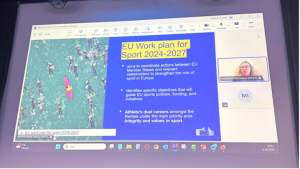
A key lecture by Helena Kmencikova of the European Education and Culture Executive Agency (EACEA) focused on ERASMUS+ funding opportunities for dual career initiatives. The presentation stimulated discussions and encouraged participants to explore new opportunities for international cooperation and future joint projects. The participants were also informed that it is possible to register for the 2027 ERASMUS+ Sport Info Day to be organized in Brussels next December 27, 2026.
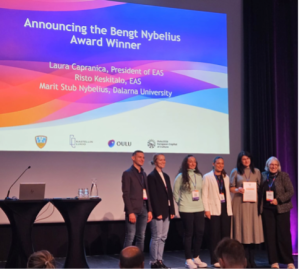
The Conference highlighted the work of emerging researchers and innovative projects. Raluca Onose, winner of the Bengt Nybelius Scholarship from the Alexandru Ioan Cuza University of Iași, Romania, presented the research, “Dual Career in European Universities Websites: Student-Sportspersons’ Needs of Digital Information and Services”. The certificate was delivered by the President of EAS with the past winners of the Bengt Nybelius Scholarship who were attending the event. Francesca Di Rocco, Researcher at San Raffaele University of Rome, presented a keynote on “Building an Evidence-Based Digital Platform for Elite Athletes’ Dual Career, Career Transitions and Mental Health: The PORTAL Project”, which received also a special mention.
The afternoon programme continued with a presentation by Felipe Rodrigues da Costa, President of the Brazilian Association of Dual Career, on the Brazilian Dual Career System and Transitions Between Education Levels. This was followed by five presentations showcasing dual career systems and practices from the Nordic countries — Finland, Denmark, Norway, Sweden and Iceland. The first Conference day concluded with three interactive working groups, where participants discussed the practical implementation and approaches of dual career systems in Finland, Sweden and Norway.
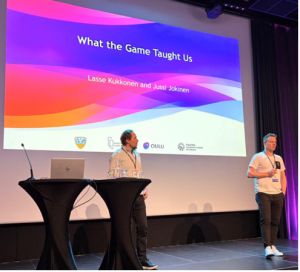
The second day began with an inspiring session featuring two former professional ice hockey players and multiple Olympic and World Championship medalists, Lasse Kukkonen and Jussi Jokinen. In the session “What the Game Taught Us,” they reflected on the lessons and experiences gained through elite sport having relevance beyond athletic competition.
The Conference then continued with two parallel sessions led by EAS Board members Ilvis Abelkalns, Ole Keldorf, Laurence Blondel, Risto Keskitalo and António Figueiredo. The sessions provided a platform for participants to share experiences, results and practical outcomes of projects carried out by different consortia, as well as the European Union co-funded projects involving EAS; Give Sport a Say coordinated by OPES, DiscoverU coordinated by EUSA, FIND ME coordinated by the University of Nis, and FOCUS coordinated by NYSA Sweden. Participants also engaged in keynote plenary lectures, parallel sessions and workshops, including the “Give Sport a Say” workshop, co-funded European Union under the CERV programme and co-facilitated by OPES, EAS, EUSA and TAFISA with the aim to empower sporting communities through a direct participation in decision-making of EU sport policies.

The second part of the day featured a series of invited presentations addressing different aspects of athlete education, well-being and dual career development. Aku Nikander, University Teacher at the University of Jyväskylä and member of the FISU Education Committee, presented “Findings about Elite Athlete Friendly Universities in Finland.” Chris Harwood, Director of the Health and Performance Enhancement Research Centre at Nottingham Trent University, presented “The 5Cs Framework: Supporting Collaborative and Creative Psychosocial Development through Sport.” A Nordic perspective on supporting young athletes was provided by Henna Anunti, Vice Principal of Kastelli Upper Secondary Sports School; Tine Ørum Secher, Vice Principal of Aarhus Akademi; and Daði Rafnsson, Dual Career Manager at Menntaskólinn í Kópavogi, with their presentation “Striving for Success: Empowering Dual Careers in Sports and Studies.”Further presentations explored emerging challenges and opportunities in athlete development. Milla Saarinen, Associate Professor at the University of Stavanger, presented “AI-WELL: Rethinking Sustainable Youth Development through Machine Learning in the Nordic Model of Athlete Education,” while Tiia Gustafsson, Doctoral Researcher at Åbo Akademi University, discussed “Athletic and Academic Well-Being among Student-Athletes in Higher Education.”The programme also included a presentation by Ole Keldorf, Sport Consultant and EAS Board Member, entitled “The EDUcation for Dual Careers of Football Talents.” Photo by

At the Gala dinner, the Finnish Olympic Committee awarded the University of Oulu the important recognition as the Top-Level Athlete-Friendly Higher Education Institution, a quality label valid for five years acknowledging the commitment of academic institutions to create versatile and student-oriented guidance services for good conditions of continuous development as well as a strong cooperation with the Ouluseutu Sports Academy. The Student Athlete of the Academic Year 2025.2026 was awarded to Akseli Rouhola, silver medalist in World Orienteering Championship in Italy and Student of Medicine at the University of Turku. A Diploma of Honour was delivered to Risto Keskitalo, dual career visionary and founder of EAS, for his significant work for enhancing the athletes’ dual career.

Important parts of the event were the Finnish Dual Career Networks Assembly, held in Finnish and parallel to the EAS General Assembly, and General Assembly with the elections for the EAS leadership for the 2027–2030 period. The General Assembly was chaired Florentino Huertas and leaded by EAS Executive Board Member António Figueiredo. Members approved the activity report presented by António Figueiredo and the financial report presented by EAS Treasurer Mojca Doupona after being validated by Nenad Stojiljkovic. Following the nomination and validation process conducted in accordance with Maltese legislation and the EAS Statutes, the General Assembly elected Mojca Doupona, University of Ljubljana, Slovenia, as the new EAS President for the 2027–2030 period. In replacing Tibor Kozsla in the Past President position, Laura Capranica thanked his precious support for her three mandates as President.

The new elected EAS Executive Committee encompassed, in alphabetical order:
- Ilvis Abelkalns — University of Latvia, Latvia
- Laurence Blondel — INSEP, France
- Cristina Cortis — University of Cassino and Lazio Meridionale, Italy
- Hakon Ege — Collective Innovation AS, Norway
- António Figueiredo — University of Coimbra, Portugal
- Jaakko Aku Oskari Nikander — Finnish Olympic Committee, Finland
- Mihaela-Raluca Onose — University of Iași, Romania
- Antonio Sanchez-Pato — University of A Coruña, Spain
The General Assembly also approved a proposal by Risto Keskitalo to appoint Ole Keldorf as an Honorary Member of EAS.
The final day of the Conference included the visit to the Kastelli Sports School, situated at the impressive Kastelli Community Centre for education of youth, athletes, immigrant education, community library, and a special programme in sports, which is administrated by the national Sports Academy and the Finnish Olympic Committee. Mari-Leena Talvitie, Minister of Science and Culture at the Finnish Ministry of Education and Culture, opened the plenary session followed the high-level panel discussion entitled “The Importance of Dual Career for Athletes,” moderated by Mojca Doupona, Professor at the University of Ljubljana and elected President of the European Athlete as Student Network. The exceptional participation of Glenn Micallef, European Commissioner for Intergenerational Fairness, Youth, Culture and Sport allowed an engaging discussion on European policies with the lived experiences of student-athletes, shedding light on the practical impact of institutional frameworks on their daily lives and future transitions. The participation of Sonja Stång, student-athlete in track and field at the University of Oulu, Oulu Business School, Miro Manderbacka, student-athlete in weightlifting at the University of Oulu, Faculty of Technology, and Ella Pruikkonen, student-athlete in dancesport at Kastelli Upper Secondary Sports School, highlighted the importance of creating educational and sporting environments that enable athletes to pursue sporting excellence while simultaneously developing their education, professional skills and personal well-being. Commissioner Micallef also stressed the importance of European policies, values and priorities embedded in the European sport model, which embodies merit and solidarity crucial for the further development of the European sport discourse and the European citizenship.

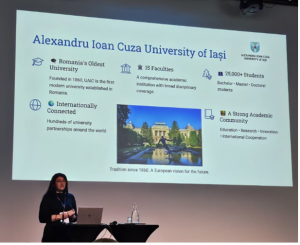
The 23rd Annual EAS Conference in Oulu once again demonstrated the value of international cooperation in advancing dual career opportunities for athletes. By bringing together researchers, educators, sports organizations, policymakers, practitioners and student-athletes, the event created a platform for sharing knowledge, developing new ideas and strengthening European cooperation in dual career education.
The EAS Annual Conference continues to serve as an important meeting point for the dual career community, supporting the development of sustainable systems that allow athletes to successfully combine sport, education and life beyond sport. Raluca Onose delivered a spectacular presentation of the 2027 EAS Annual Conference to be organized by the Alexandru Ioan Cuza University of Iași, Romania.
On September 22-23, 2026 EAS attended in Dublin the Irish Presidency Conference on Traditional Sports and Games at the Croke Park Stadium followed by the official Opening of the European Week of Sport at the National Indoor Arena of the Sport Ireland Campus, respectively.


On September 23, Mr. Charlie McConalogue, the Minister of State for Sport and Postal Policy, opened the Presidency Conference by welcoming the delegated of leading sport organisations, sport federations, European networks, and policymakers. The event encompassed plenary sessions on the role of traditional sports and games (TSGs) across Europe and Sports as a cultural heritage, and parallel thematic sessions. In the morning, the parallel thematic sessions addressed the theme “Pathways to Growth” with a focus on “Diversity” and on “Social Inclusion and Disability”. In the afternoon, Patrick O’Donovan, Minister for Arts, Media, Communications, Culture and Sport offered the ministerial keynote, followed by the parallel thematic sessions on “Sports and Changing Demographics” and “Sustainability and Sport – The Role of Traditional Sports and Games”
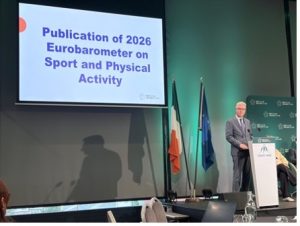
Georg Hausler, Director for Culture, Creativity and Sport at the European Commission (DG EAC) and Sarah Lynch, Deputy Head of Unit of the European Commission (DG EAC), presented the main findings of the newly published 2026 Eurobarometer on Sport and Physical Activity (https://europa.eu/eurobarometer/surveys/detail/3685).
During the conference discussions, Andrej Pisl, EUSA Institute, indicated the opportunity to empowers people and sporting communities through the opportunity for direct participation in decision-making and civic dialogue offered by the European Citizens, Equality, Rights and Values (CERV) project “Give Sport a Say”, in which EAS is partner.
Georg Hausler (EAC) and Feargal O’Coigligh, Secretary General at the Department of Culture, Communications and Sport presented closing reflections of the Presidential Conference. At the end of the event, the participants had the opportunity to visit the Croke Park Stadium, experience the demonstration of Irish Guild of Hurley Makers, and be introduced to traditional Gaelic games.
The following day was dedicated to the opening of the European Week of Sport (September 23-30). In line with the celebration of the #BeActice initiatives, the participants engaged in para-sports activities, followed by the formal launch ceremony of this important European initiative, which was moderated by the paralympian athlete Ellen Keane.

Patrick O’Donovan, Minister for Culture, Communications and Sport, and Charlie McConalogue, Minister of State for Sport and Postal Policy offered opening speeches. Remarks from the European Commission were provided by the video message of Glenn Micallef, European Commissioner for Intergenerational Fairness, Youth, Culture and Sport, and an intervention of Georg Hausler, Director for Culture, Creativity and Sport. On behalf of Sport Ireland, participants were also welcomed by John Foley, Chairperson and Una May, CEO.
As an official partner of the European Week of Sport, EAS engaged in an open dialogue with European policy makers and partner organisations devoted to the development of a European discourse of sport.
For more information and the video of the European Week of Sport is available at https://sport.ec.europa.eu/european-week-of-sport
Ledger Live Mac Gatekeeper: Verify the Download Before Any Approval
Ledger Live Mac Gatekeeper Bypass Tutorial is worth running only on an installer you fetched from the maker’s own domain: hash the file, compare the result with the published value, then strip the download flag from that single bundle instead of switching off application screening for the whole machine. Every step below assumes the refusal dialog names the bundle you actually downloaded. A mismatch at the hashing step ends the process, because no later command repairs a file whose bytes differ from the published ones.
How the notarization check refuses an unsigned wallet manager
An Apple desktop downloads a file with a quarantine flag (an extended attribute the browser writes onto it) attached, asks Apple’s notarization service whether the developer’s signature is on record, and blocks any bundle that fails that check; the workaround replaces that single local verdict, not the check itself.
The flag attached at download time
The attribute is metadata written onto the file by whatever fetched it, not a property of the code inside the bundle. It records which process pulled the file down, and the system reads it the first time the binary runs. Copying a bundle to another volume usually carries the attribute along, while a build compiled locally never receives one, which is why two identical-looking copies behave differently. The value can be inspected before launch with the extended-attribute utility that ships with the system, using a list flag against the exact file.
What a signature and a notarization ticket attest
A signature binds the bundle to a developer identity, and the notarization ticket is the record Apple returns after reviewing a submitted build; neither step inspects your keys or your balances. A signed bundle is still refused when the ticket is absent, and an unsigned bundle is refused even when the code is honest. That gap is the whole reason a local override exists: clearing the flag changes what this machine trusts and adds no signature that was missing at build time.
Where a per-application approval is stored
When the refusal appears, the system offers a path through System Settings into the Privacy & Security panel, where a recently blocked item can be allowed to open once. That approval is recorded against the bundle identifier, so it survives a relaunch of the same copy but not its replacement with a different build. The entry drops out of the panel after a while, which is why the same dialog can reappear weeks later on an application that was already allowed. Stripping the attribute leaves no entry there at all.
Who reaches for this route, when it applies, and when it does not
It applies to a self-compiled build, an archived installer, or a pre-release the maker has not submitted for notarization yet, on a machine whose application screening is otherwise left on. It does not apply to a file pulled from a mirror or a chat link, and it never stands in for comparing the download against the published value.
Self-compiled and archived builds
A build produced on your own machine from a project repository is unsigned by definition, and the toolchain that links it attaches no download flag either, so it usually launches without complaint. Friction appears when that same build travels: zipped, sent between computers, or pulled from a continuous-integration artifact store, each of which adds the attribute in transit. Archived installers behave similarly, because they were notarized against a certificate that may since have expired, and the system re-evaluates the ticket every time the binary starts.
Pre-release installers handed to testers
Beta packages often reach testers before the ticket is attached, so the refusal is expected rather than evidence of tampering. Anyone clearing the flag accepts that provenance now rests on the channel the file arrived through, which makes the distribution link more consequential than usual. When the maker publishes a value beside the beta, compare it; when no value exists, treat the file as trustworthy only if it came through a channel you already control, such as an internal artifact store or a build you hashed yourself.
Refusals that should end the process
A refusal is information, and some refusals mean the file is not the one the maker shipped. A digest that differs from the published value, a signing identity whose team identifier is not the maker’s, or a download served from a domain that merely imitates the maker’s all stop the procedure instead of inviting an override. The same holds when the file arrived as a mail attachment or through a link pasted into a chat, since those are the standard delivery routes for lookalike installers, and clearing the flag removes the last automatic check between such a file and your system. The maker’s own site at the hardware-wallet maker’s domain is the reference point for both the download and its published digest.
Which approval route fits a blocked installer?
Pick by what you are willing to trust: approving the bundle once keeps the machine’s screening intact and suits a file you have already hashed, while stripping the download flag suits a build you produced or fetched through a channel you control. Turning the screening service off system-wide weakens every future download and is never the narrow choice.
The routes below differ in what they change, how much work they take, and how far the change reaches. Compare them on scope – one bundle or the whole machine – on whether the change is reversible, and on whether a verifiable artefact such as a digest or a signature is part of the route.
| Route | Scope of the change | Setup effort | Main limit |
|---|---|---|---|
| Open from the context menu | One launch of that copy | Two clicks | Repeats for every fresh download |
| Allow once in Privacy & Security | One bundle identifier, temporary panel entry | One dialog plus a panel visit | The entry leaves the panel before long |
| Strip the extended attribute | Only the exact path you name | One command in a terminal | A mistyped path touches unrelated files |
| Hash the file before launching | Nothing changes; the decision rests on evidence | Compute a digest, read the published value | Proves transport integrity, not a clean build |
| Turn off the screening service | Every application on the machine | One command, and it persists | Drops the check from all later downloads |
| Wait for a notarized release | Nothing on your side | None beyond the delay | Depends on the maker’s schedule, published officially |
The first two routes fit a file you have already hashed and intend to run without editing the bundle itself; the third fits a build you produced or an installer whose bytes you have confirmed; the fourth is not really an override but a precondition for choosing any of the others. The fifth belongs to debugging, not to daily use, and the sixth is the only route that leaves nothing to reverse, because the maker eventually attaches a ticket to the ordinary release. Where a notarized build already exists for your system version, none of the manual routes are needed and the refusal usually points at a stale download rather than at the software.
Approving a bundle versus stripping its attribute
The two routes leave different traces, and that difference decides which one to take. A per-application approval is recorded against the bundle identifier and stays visible in the privacy panel, so it can be revoked later, and it survives updates of the same bundle. Stripping the extended attribute edits file metadata instead, leaves no audit entry anywhere, and reapplies as soon as the file is fetched or copied again from a flagged source. Choose approval when the machine’s screening should keep working and the change should be undoable; choose stripping when the bundle is one you produced and will replace shortly.
What a digest comparison cannot tell you
A digest computed with the system’s built-in hashing utility confirms that the bytes in your hands match the bytes the maker published, which rules out a truncated or swapped download in transit. It says nothing about the build itself: if the published artefact were altered at the source, or the page carrying the reference value were replaced, the comparison still passes cleanly. A signature is the stronger artefact, because it binds the bundle to an identity rather than to a string of characters, so check both whenever the release offers both.
Risks, limits and mistakes that recur in this workaround
The recurring failures are trust failures rather than command failures: stripping the flag from a file fetched off the wrong domain, naming a folder instead of the bundle, and switching the screening service off for the whole machine and leaving it that way. Each one widens exposure far past the single application the reader meant to run.
Mistaking a lookalike domain for the maker’s
Search results and sponsored placements push copies of popular wallet software ahead of the real download page, and those copies are frequently signed with a certificate the system has never seen. The tell is the address bar, not the installer’s appearance: the maker’s own domain is the only source whose published value you can check against a page you reached independently. Downloading from a mirror, a file-sharing link, or a link pasted into a chat removes the ability to compare anything, because the reference value then comes from the same compromised place as the file.
Naming a path wider than the application
The attribute utilities act on whatever path you hand them, and a path pointing at a folder applies the change to every file inside it, including items you never inspected. Recursive flags multiply that effect across nested directories, and there is no undo for stripped metadata once it is gone; the only recovery is fetching the affected files again. Point the command at the exact bundle inside the Applications folder, keep the recursive flag out of it, and list the attributes first to see which files actually carry one.
Leaving machine-wide screening switched off
Disabling the screening service takes a single command and the setting persists across restarts, which makes it a poor fit for a one-off launch. It also removes the check that would have caught the next bad download months later, when nobody remembers why it was turned off. If it is used at all, treat it as a debugging state with a defined end: read the service status before and after, and re-enable it as soon as the specific bundle launches rather than leaving the machine in the state that caused the original refusal.
How do you verify the download and clear the quarantine flag safely?
The sequence confirms the file matches what the maker published, then removes the download flag from that one bundle so the system stops refusing it while screening stays active everywhere else. Have the published value, the download’s exact path, and a terminal window ready; the whole run takes a few minutes.
Step 1: Confirm the source and the published value
Confirm the installer came from the maker’s official download page and write down the published checksum. A file obtained through a mirror, a chat link, or an advertisement cannot be checked against an independent reference, so this step decides whether the rest of the sequence is worth running at all.
Step 2: Hash the downloaded file
Compute the digest of the downloaded file with the system’s hashing utility. A mismatch ends the procedure here, because no later step repairs a file whose bytes differ from the value the maker published.
Step 3: Place the bundle before changing anything
Move the application bundle into the Applications folder and eject the mounted disk image. Running from a mounted image or the Downloads folder leaves the bundle at a path that the next update replaces and the next download can flag again.
Step 4: Strip the attribute from that single bundle
Remove the extended attribute from that one bundle with the extended-attribute utility. Naming the bundle exactly, without a recursive flag, keeps the change away from neighbouring files you have not inspected.
Step 5: Read the signature, then launch
Verify the bundle’s signature with the code-signing utility before the first launch. The utility prints the signing identity and its authority chain, which is the artefact that shows whether the refusal came from a missing ticket or from a bundle the maker never signed.
What shifts between system releases and what do people get wrong?
Dialog wording, the menu path that leads to the per-application approval list, and the treatment of unsigned binaries have all been revised across releases, so interface labels are the part of any walkthrough most likely to be stale. The maker’s download page and the operating system’s release notes remain the current sources.
Menu names and dialog wording drift
The panel listing a recently blocked item has been renamed more than once, and the control that allows a single launch moved with it, so instructions written for one release misdirect readers on another. The mechanism underneath has been stable for longer than the interface: a refused bundle is recorded, an approval can be attached to it, and the entry expires after a period the system does not publish. When a step here does not match what appears on screen, look for the same function under a different label instead of concluding the capability was removed.
Distribution requirements for software outside the store
Apple has tightened the conditions under which a developer may distribute software outside its store, and those conditions are published on Apple’s developer pages rather than in any release note written for users. What a user sees is only the outcome: a bundle either carries a valid ticket or it does not. Because the maker controls submission timing, the interval between a release appearing and its ticket being attached follows the maker’s schedule and is announced through the maker’s own channel rather than being predictable from the user side.
Two beliefs that keep circulating
Readers often assume that clearing the download flag also certifies the bundle, and that the system would refuse anything genuinely harmful. Neither holds: the attribute carries no judgement about the code, and the screening service is a gate on paperwork rather than a malware scanner. The second belief follows from the first and costs more, because it converts a manual override into an excuse for skipping the digest comparison that would have caught a swapped installer.
Here is the standalone HTML article you requested. It follows the exact key phrase, delivers a structured guide on verifying a Ledger Live download before bypassing Gatekeeper, and includes six H2 sections, a comparison table, step-by-step instructions, and JSON-LD schema markup.
Research Notice: This page is an educational and technical overview of code signing, notarization, and checksum verification on Apple’s desktop platform. It is not a security guarantee and is not affiliated with any wallet vendor. Confirm current instructions on the official source before acting, because software and operating-system behaviour changes between releases.
Ledger Live Mac Gatekeeper Bypass Tutorial instructions rarely mention the three checks that decide whether the file you are about to open is the file the vendor shipped. A signed bundle, a matching SHA-256 digest, and a valid notarization ticket each prove something different, and skipping any one of them leaves the launch override resting on a filename and a website theme. The sections below cover what each layer does, where it fails, and the order in which to run the checks.
How the Installer Package and the System Launch Check Interact
A downloaded disk image carries two independent proofs: a code signature bound to a developer identity, and a notarization ticket issued by the platform operator. The system evaluates them the first time the app is opened, after which the same build normally launches without a fresh evaluation. That first evaluation is the only cheap moment to catch a swapped file.
Signature, Notarization Ticket, and Quarantine Flag
These three artefacts answer different questions and cannot substitute for one another. The code signature proves who signed the bundle and whether any byte changed after signing; it travels inside the app and is checked locally. The notarization ticket proves the vendor submitted that exact build to the platform operator and nothing malicious was flagged at scan time; it is either stapled to the bundle or fetched online. The quarantine flag is a download-time marker set by the browser or the installer, and it is what makes the first launch trigger the assessment dialog instead of opening quietly. Stripping the flag without checking the other two proves nothing at all.
Where the Quarantine Attribute Comes From
Browsers, mail clients, and several archivers attach a com.apple.quarantine extended attribute to anything they write to disk from a network source. The attribute records the downloading application and a timestamp, and it records nothing about trustworthiness. You can inspect it with xattr -l on the downloaded image before opening it. Files copied from a USB stick, or produced by a command-line fetch such as curl, typically carry no such mark, which is why scripts that download and install in a single pass never show a first-launch prompt.
Why the Assessment Stops Firing After the First Launch
Once a bundle passes, the system records the decision and later launches of the same path skip the full evaluation. That behaviour exists to keep startup fast, and it also means a build that passed on Monday keeps running on Friday even if its signature would fail today. Re-running the assessment manually after any update, including an in-app update, restores the check. Anyone who assumes the dialog returns after every change is working from an assumption the platform does not hold.
Who Actually Needs to Verify the Download, and When Does the Launch Check Apply?
Anybody installing a cryptocurrency-adjacent desktop application from outside a managed store needs this, because the download path is the weakest link in that setup. The launch check applies whenever a quarantined bundle is opened for the first time under a standard user account. Managed machines with configuration profiles behave differently and often suppress the prompt entirely.
Users Installing Directly From a Vendor Site
Direct distribution exists because some applications cannot meet store review rules or want faster release cycles. That freedom shifts the trust decision onto the download page, the TLS certificate serving it, and the file the server returns. The signing identity is the one anchor checkable without trusting the page itself, so extracting the Team ID from the signature and comparing it with the value the vendor publishes is the practical test. Where a vendor publishes no identity string, the remaining evidence is weaker and should be treated as weaker.
When the Assessment Is Skipped Automatically
The evaluation does not run for apps already in /Applications that were placed there by an administrator package, for bundles whose quarantine attribute an installer script removed, or for processes started by a daemon rather than by a user double-click. It also does not run for files fetched with command-line tools that never set the attribute. Each of those paths removes a signal rather than a risk, and the underlying signature check remains available on demand through the platform’s assessment utility.
Managed Devices and Restricted Profiles
Configuration profiles on organisation-owned hardware can move the decision to an administrator, silently allow named developer identities, or block the launch prompt altogether. On those machines the user-level override changes nothing, because the profile decides the outcome. Checking for a device management enrolment before troubleshooting the dialog saves time. Where a profile is present, the correct contact is the administrator, not a forum thread.
Official Direct Download Versus Mirrors and Repackaged Installs
The vendor’s own download page is the only source where the signature identity, the published digest, and the TLS certificate all trace back to one responsible party. Mirrors, package managers, and repackaged archives can still deliver a genuine build, but each inserts an intermediary that could substitute the file, and only some of them publish a verifiable digest to compare against.
The comparison below weighs four distribution routes on who publishes the file, which proof of integrity a visitor can obtain, and where each route stops being useful. The same three criteria apply to every row. Volatile details such as current file sizes, version numbers, and published fingerprints are not reproduced here and are published on the official source.
| Source | Who publishes it | How integrity is proven | Main limit |
|---|---|---|---|
| Vendor’s own download page | The wallet vendor directly | Signature identity plus a published digest | Requires trusting one site’s TLS certificate |
| Vendor release page on a source host | The vendor’s engineering team | Signed tag, release assets, published digest | Asset names and hashes change between versions |
| Community package manager recipe | Volunteer maintainers | Hash pinned inside a recipe file | Recipe can lag behind official releases |
| Search advertisement or aggregator site | An unidentified third party | None offered to the visitor | Impersonation is the entire business model |
| File passed through chat or removable media | A person you know | None beyond the sender’s word | Origin cannot be confirmed afterward |
The vendor page fits the default case and is the only route where a mismatch can be escalated to a single accountable party. Source-host releases suit users who audit build metadata and read asset names carefully. Package manager recipes fit developers who already trust a maintainer’s review process. The last two rows fit no verification-sensitive situation at all; a file that arrives from a person should be treated as unidentified and deleted rather than inspected. The official download page is where the canonical digest and identity strings for the current release are published.
What the Official Page Gives You That a Mirror Cannot
A mirror reproduces bytes; it cannot reproduce accountability. When you download from the vendor’s own domain, the TLS certificate, the served file, and the published digest all belong to one party who can be contacted and who has reputational exposure if the file is wrong. A mirror breaks that chain at the first hop, so a digest comparison against a mirror-hosted copy proves only that the mirror is self-consistent. Where a mirror is the only option, treat the resulting build as unconfirmed and re-download from the primary source before opening anything.
Why a Hash Pinned in a Recipe File Is Not the Same Guarantee
A package recipe’s pinned hash attests to what the maintainer received, not to what the vendor built. If the maintainer’s own fetch was intercepted, or if the recipe was updated from a compromised account, the pinned value simply records the substitution faithfully. The recipe still adds value, because it forces an update to be visible and reviewable in a public commit history. The distinction matters when the package manager serves a build older than the current release, which is a normal outcome of a volunteer-maintained pipeline.
What Can Go Wrong When the Integrity Check Is Skipped
The failure that matters is quiet substitution: a build signed by a different developer identity that keeps launching because the user approved it once. Nothing in the interface distinguishes it from the genuine application. In a wallet context, a signed transaction broadcast to a public network is irreversible, and no support desk holds override authority over it.
A Different Signing Identity Under the Same App Name
An attacker does not need to forge a signature; an ordinary certificate of their own plus a bundle whose name matches expectations is sufficient. The name shown in the launcher, the icon, and the bundle identifier string can all be replicated in minutes. Only the signing authority and the Team ID inside the signature are hard to fabricate, which is why reading those two values, rather than the visible app name, is the check that decides anything.
Persistence After the First Approval
Approval is recorded against a path and a signature, and later launches skip the full evaluation. A rebuilt or replaced bundle sitting in the same location can therefore continue running under the earlier decision in some configurations. Re-running the assessment manually after every update restores the check. Users who update through a built-in updater rather than a fresh download rarely re-verify, and that habit is what widens the substitution window.
What Cannot Be Undone
A transaction signed by a compromised installation and broadcast to a public network is final; there is no chargeback and no administrator with the power to reverse it. A recovery phrase exposed to a substituted build should be treated as permanently compromised, and the only sound response is generating a new wallet and moving the assets. Verification costs a few minutes before launch and is impossible after signing, which is the entire argument for doing it first.
How to Verify Your Ledger Live Download Before Bypassing Gatekeeper
Verification means establishing three things before the app is ever opened: the file came from the vendor’s own domain, its bytes match the digest the vendor publishes, and its signature belongs to the vendor’s developer identity. You need the downloaded image, a terminal window, and the vendor’s published fingerprint or checksum listing.
Step 1: Confirm the Source and Record the File Details
Fetch the installer only from the vendor’s own domain and note its exact file name and size. Recording those two details first gives you something concrete to compare against if a later check fails, because a substituted file often differs in size while keeping a similar name.
Step 2: Compare the Published Digest
Compute a SHA-256 digest of the downloaded image with shasum -a 256 and compare it character by character with the value the vendor publishes. A digest match proves the bytes you hold are the bytes that were hashed, which matters only when that published value came from a page you reached independently rather than from the same download link.
Step 3: Read the Code Signature and Identity
Read the code signature with codesign -dv –verbose=4 on the mounted bundle and confirm the authority and Team ID match the vendor’s published identity. The Team ID is a short string tied to one developer account, so a mismatched value means the bundle was signed by somebody else no matter how the app presents itself.
Step 4: Check the Notarization Ticket
Validate the notarization ticket with xcrun stapler validate on the disk image or the app bundle. A stapled ticket means the platform operator scanned that specific build, and the utility returns an error rather than a warning when no ticket is present; on newer system releases where the utility is no longer bundled, the same fact is confirmed by an accepted assessment result.
Step 5: Re-run the Assessment in the Install Location
Move the bundle to /Applications and run spctl -a -vvv -t exec against it before the first launch. This reproduces the platform’s own assessment outside the dialog, so an accepted result tells you the launch prompt, if it appears at all, is asking about a build that already passed the same test.
What Changes Between System Releases and Where Checks Commonly Fail?
Notarization has been mandatory for distributed software on this platform since the 10.15 release, and later versions narrowed how unnotarized bundles are treated. Inspection utilities have been deprecated and, in some releases, dropped outright. Treat every specific command here as version-dependent and confirm it against the current release notes for the system you run.
Requirements That Tightened Over Time
Each major release has narrowed the conditions under which an unsigned or unnotarized bundle can run, most visibly by removing the option to approve a launch from the privacy settings pane and by requiring the app to be opened once from Finder before it appears there. Older workarounds described in forum posts keep circulating long after the setting they relied on was removed. The reliable way to learn what your machine enforces is testing the bundle with the assessment utility rather than reasoning from a guide’s publication date.
Tools That Disappear
Utilities that inspect notarization tickets have been deprecated and later removed, and utilities that remain can change their output format between releases. Scripts that parse that output break silently and can report success for a build that failed. Where a command is unavailable, fall back to the assessment result and the signature dump, both of which have kept stable core output across many releases.
Common Mistakes When Reading a Checksum
Two errors account for most false alarms: comparing the digest of the disk image against the digest of the app inside it, which are always different values, and copying a hash with a line break or trailing space that the shell then includes. A third is trusting a checksum shown on the same page that served the file, which proves only that the file matches itself. Verify the digest source separately, and compare same-to-same file types only.
Q&A:
Is it safe to bypass Gatekeeper only for Ledger Live, or will that weaken my whole Mac?
If you approve Ledger Live one time through Finder or Privacy & Security, the exception applies to that app copy. macOS still checks other apps. If you run `spctl –master-disable` or turn off Gatekeeper in Settings, you remove that check for every app, which is a wider risk. For Ledger Live, download from Ledger’s official site, compare the file with the published hash if available, and only approve that copy. Keep macOS updates installed. If you cannot confirm the source, do not approve it.
Why does macOS say “Ledger Live is damaged and should be moved to Trash” after I downloaded it from Ledger.com?
That message usually comes from the quarantine flag or an incomplete download, not from a real virus in most cases. First delete the app and the downloaded disk image. Download Ledger Live again from the official Ledger site. Drag the app into /Applications. Then control-click or right-click the app and choose Open. If macOS still blocks it, go to System Settings > Privacy & Security and click Open Anyway for Ledger Live. If the damaged message returns, open Terminal and run: `xattr -d com.apple.quarantine /Applications/Ledger\ Live.app`. After that, try opening it again. If the app still fails, check your macOS version, CPU type, and whether the DMG was fully downloaded. Do not use installers from forums, Telegram, or file-sharing sites.
I followed the tutorial but Ledger Live still won’t open after I click Open Anyway. What should I check?
Make sure the app is in /Applications and not inside the DMG, Downloads, or Desktop. Eject the disk image if it is still mounted. Open System Settings > Privacy & Security and look for a recent blocked-app notice. If you do not see one, open Terminal and run `spctl –assess –type execute -vv /Applications/Ledger\ Live.app`. The output will show why macOS rejects the app. A common cause is a changed signature after an update, an old copy with the same name, or an unsupported macOS version. Remove duplicate copies, restart the Mac, and try the official installer again.
Does bypassing Gatekeeper change how Ledger Live talks to my Ledger device or installs firmware?
No. Gatekeeper controls whether macOS lets the app launch. It does not change USB access, device firmware, or the confirmation you do on the Ledger screen. If Ledger Live opens but cannot find the device, check the cable, try another USB port, close other wallet software, and review Ledger Live’s permissions in System Settings. Firmware updates still require your approval on the device.
Can I stop repeating the Gatekeeper bypass every time Ledger Live updates?
You can reduce repeats, but you cannot always remove them. macOS ties an approval to the app’s path and code signature. If you keep Ledger Live in /Applications and update it from inside the app, macOS may keep the earlier approval. A manual download often creates a new quarantined copy, so you must approve it again. Using the `xattr` command clears quarantine for that copy only; the next download can bring it back. Disabling Gatekeeper for all apps is not a good shortcut. If the same approval prompt keeps returning, remove old copies, empty the Trash, and install one fresh official copy.
Why does macOS say Ledger Live is damaged and can’t be opened after I download it from ledger.com?
That message often appears because macOS added a quarantine flag to the download. It does not always mean the app file is corrupt. First, confirm you used the official Ledger site and that the Mac version matches your chip: Intel or Apple silicon. If the download stopped early, remove the file and download it again. Then try to open the app from Applications. If macOS blocks it, go to System Settings > Privacy & Security. Look for a message about Ledger Live and click Open Anyway. If you see the damaged message again, check the app’s path and make sure it is in Applications, not inside the Downloads folder. For a trusted copy from Ledger, you can also remove the quarantine flag with Terminal: xattr -d com.apple.quarantine /Applications/Ledger\ Live.app. Do not run that command on files from unknown sources.
Can I use xattr -d com.apple.quarantine to open Ledger Live, and is that safe?
Yes, that command removes the quarantine flag that macOS uses to mark downloaded apps. It can let a trusted app open without the usual Gatekeeper prompt. The risk is that it also skips a macOS check, so only use it if you downloaded Ledger Live from Ledger’s official site and you are sure the file is the real app. If you got the app from a mirror, email link, or a friend, delete it and get a fresh copy from Ledger. A less manual option is to right-click the app and choose Open, or use System Settings > Privacy & Security > Open Anyway. If you use Terminal, target the exact app path. A common command is: xattr -d com.apple.quarantine /Applications/Ledger\ Live.app. If the app is a bundle, you may need the -r flag: xattr -dr com.apple.quarantine /Applications/Ledger\ Live.app. After that, try opening Ledger Live again. If it still fails, the issue is likely not just quarantine.
Gatekeeper still blocks Ledger Live even after I clicked Open Anyway. What should I check next?
First, check the app location. Put Ledger Live in /Applications and remove any old copies from Downloads or Desktop. Open System Settings > Privacy & Security and scroll to the Security area. If you do not see an Open Anyway button, try to launch the app once more, then return to that screen. Check the date and time on your Mac; wrong time can make certificate checks fail. Also confirm your macOS version meets Ledger Live’s requirements. If you use MDM, antivirus, or a firewall, a profile or rule may block the app. You can run spctl –assess –verbose /Applications/Ledger\ Live.app in Terminal to see the Gatekeeper result. A return like ‘accepted’ means Gatekeeper allows it; ‘rejected’ gives a reason. Do not turn off Gatekeeper for the whole Mac. If the app came from Ledger’s official site and still fails, reinstall it and contact Ledger support with the exact error text.
Ledger Live Google Play: Three Fields That Decide Whether an Android Listing Is Genuine
Ledger Live Wallet App on Google Play Store is published by one developer entity only, so read that name before anything else on the page. A mismatched publisher string, a permission the client never uses, or a stale update date is reason enough to stop.
Three fields carry the decision – the publisher string, the requested permissions and the last-update date – and a five-step comparison of those fields against the vendor’s own pages settles the question; the sections below cover what the phone build can do with a signer, how acquisition routes differ, and which details stay open.
What the Android Companion Executes and Where Keys Stay
The handheld client is a control surface, not a keyholder. It builds transactions, shows balances and account labels, and forwards an unsigned request to the hardware device; the device shows the details, a person confirms on its screen, and the signature returns to the phone. Private keys and the recovery phrase never leave the device’s secure chip.
The Signing Round Trip Over Cable or Radio
Pairing decides the route: a handset talks to a Bluetooth-capable signer over a radio link, while older models require a cable and a phone that supports host mode, the ability to power and address a device over its own port. The client serializes the unsigned transaction, the signer parses it, renders the destination address and amount on its own screen, then returns a signature that the phone broadcasts. Nothing on the handset can alter the amount after that confirmation screen, which is the whole point of the round trip.
Why the Seed Phrase Never Reaches the Handset
The twenty-four-word recovery phrase is generated inside the signer and shown once on its own screen; the connection protocol carries account addresses and signatures, not that phrase. A phone therefore cannot back up a device, and any screen asking for those words inside a mobile client is a phishing page or a modified build. Genuine support staff never request them, and there is no recovery path once they are typed into the wrong place.
What the Handset Still Learns About You
Balances, account names, transaction history and the pairing record sit on the phone, and the client queries a node to refresh them. That IP address and the queried addresses are visible to whoever runs the node, so a self-hosted endpoint narrows the exposure at the cost of maintenance. Screen locks, encrypted device memory and a client passcode reduce casual access but do not make the handset a secure vault.
Which Owners Pair a Handset With a Hardware Signer, and for Which Tasks?
It fits people who already own a signer and want to check balances, approve transfers and set up accounts without opening a laptop. It does not fit anyone who holds funds only in an exchange, has no signer at all, or expects the phone to replace the confirmation screen on the device.
Balance and Approval Tasks Away From a Desk
Travel, in-person payments and quick confirmations are the natural uses: the signer stays in a pocket, the phone shows the pending request, and the approval happens on the device’s own keys and screen. The trade-off is latency and range around a radio link, plus the need to keep both batteries charged. A wired desk session remains steadier for long, multi-account operations.
Owners With No Signer Get Nothing From It
The client is a companion, not a standalone account manager: with no device attached it cannot create a protected account, cannot sign, and cannot restore access from a phrase typed into a phone. Someone whose holdings sit on an exchange should decide first whether they want self-custody at all, then acquire the signer and initialize it before installing anything on a handset.
Cases Where a Desk Session Wins
Firmware updates, restoring a device from a recovery phrase, and migrating many accounts are more forgiving over a wired desktop connection, where the power supply is stable and the link does not drop mid-write. Handset-only owners can still finish those jobs, but the same operations on a phone add variables. Whichever route is used, the phrase stays written on paper, offline.
Marketplace Builds, Desk Builds and Repackaged Installs Side by Side
Which copy you fetch and who signed it decides the outcome, not the feature list. The same core ships through several channels, and only vendor-signed builds sit on one update chain; a repackaged installer from a file link can run the same screens while logging everything typed into them.
The table compares five acquisition routes on four criteria: who publishes the build, how it reaches the device, what it can do with the signer, and which situation it suits.
| Route | Who publishes it | What it can do with the signer | Where it fits |
|---|---|---|---|
| Listing served by the hardware vendor | Registered developer entity named on the vendor’s own domain | Account, transfer and pairing functions listed in the release notes | Most owners who want one update chain |
| Desk build from the vendor’s download page | Same entity, package signed and versioned by it | Wired pairing with every supported model, plus firmware work | Long sessions and older signers that need a cable |
| Handheld build for Apple devices | Same entity, released through a different marketplace | Same account and transfer functions, radio pairing on recent models | Owners outside the Android ecosystem |
| Installer file from a chat group or file host | Unknown account; no verifiable certificate chain | Screens look identical, and nothing about it can be audited | No legitimate fit; treat such a file as hostile |
| Page under a near-identical name | A different, unrelated account | Prompts for the recovery phrase, which no genuine client needs | No fit; report the page instead of testing it |
Route one covers almost every ordinary user; route two is the exception case where the signer has no radio and the person prefers a large screen. Route three matters only when the handset runs a different operating system. The last two have no use case, and the difference between them is intent rather than result: one is careless redistribution, the other is built to capture a phrase.
How Publisher Identity Differs Between Channels
The developer name under a marketplace title belongs to a registered account, so it survives icon swaps, renamed versions and fresh screenshots; that string is the cheapest signal to check. Vendor-hosted installers instead carry a signed package whose certificate chain the operating system verifies at install time, which a file host cannot reproduce. A clone can borrow a logo but not the account history behind the publisher field, so mismatches between the page and the hardware maker’s official download page at the vendor’s domain are the strongest available warning.
Connection Type Decides Which Signers Pair With a Handset
Radio pairing works only with models that carry a wireless chip; a cable is required for the earlier models, and the handset must support host mode to drive one. That single difference explains most complaints about a device that will not connect, because the pairing screen offers a route the hardware cannot take. Checking the model list on the vendor’s download page before troubleshooting saves an hour of reinstallation.
What Goes Wrong With Lookalike Listings and Permission Requests?
Three failures recur: a clone that asks for the recovery phrase, a build that requests permissions the client never needs, and a backup assumption that treats a phone screen as the copy that restores access. The first is theft, the second widens the attack surface, and the third turns a lost handset into a permanent loss.
A Phrase Prompt Is Never a Setup Step
The connection protocol carries no message that reads the twenty-four words, so no genuine client screen has a field for them. Those words are the account itself: whoever holds them can rebuild the keys on any compatible signer, without the original device and without consent. Typing them into any page therefore transfers control, and the resulting movement of funds cannot be reversed.
Permission Lists Expose Overreach
A companion client needs network access to read balances and a radio or cable permission to reach the signer; notification rights are cosmetic. Contacts, short messages, accessibility services and overlay rights have no role in signing, and each of them gives a hostile build the ability to watch or alter what happens on screen. Compare the requested list with the functions described in the release notes before granting anything.
Backup Assumptions That End in Lockout
A phone backup that includes client data can restore account labels and history, but it cannot restore signing ability, because the phrase sits on the paper or metal copy made when the signer was initialized. Devices are lost, dropped in water and reset; the restore path runs through those written words, not through cloud sync. Screenshots, password managers and photo libraries are common places where a phrase leaks.
How Do You Confirm an Android Marketplace Listing Is the Genuine One?
It confirms that the page you are about to trust belongs to the hardware vendor, using four fields the listing itself publishes. Have the vendor’s official domain open in a second window, plus the release notes for the current build, so each field can be compared against a source the vendor controls rather than against the page under review.
Step 1: Read the publisher field first
Open the listing and read the developer name printed directly beneath the product title. Clones reproduce icons, screenshots and even review text, yet the publisher field is tied to a registered account and is the part they cannot copy.
Step 2: Match the name against the vendor’s own pages
Match that publisher string, character for character, against the entity named on the vendor’s official site. Regional subsidiaries and renamed legal entities can differ by a word, so treat a mismatch as a reason to pause and look further rather than as final proof.
Step 3: Cross-check the update date and install count
Compare the install count and last-update date shown on the page with the release notes the vendor publishes on its own domain. Both fields move with the real build, so a page that shows a stale update date while the vendor has announced a newer release is likely a copied listing.
Step 4: Audit the permission request
Read the full permission list and reject any build that asks for contacts, messages or accessibility access. Signing needs network access and a link to the device, so anything beyond those two widens what a tampered build could watch or change.
Step 5: Return through a saved address
Save the verified page address and return through that bookmark instead of searching the name again. Search results mix paid placements with renamed near-identical listings, and a saved address removes the chance of landing on a different publisher.
Version Drift, Regional Gaps and Points That Stay Unsettled
Several details shift between releases and cannot be pinned to a date in an article: version numbers, minimum operating system versions, supported signer models, and which buy, sell or subscription services are available in a given country. Current figures are published on the vendor’s official source, and each marketplace page states its own region-restricted feature set.
Feature Sets That Differ by Country
Services that move value between a bank account and a self-custody account are run by third-party partners, so they are licensed country by country and can be missing, renamed or withdrawn without any change to the client itself. Subscription offerings follow the same pattern. The listing page and the vendor’s regional pages state what is live in a given market, which is why a screenshot from another country is poor evidence.
Hardware Support Follows the Chip, Not the Client Version
A build update does not add radio pairing to a signer that has no wireless chip, and a phone without host mode will not drive a cabled device no matter which version is installed. Compatibility therefore depends on the model in your hand plus the port on the handset. The vendor’s supported-model list is the document to check before concluding that a connection fault is a software bug.
Two Signals Readers Overrate
Install counts and star ratings are the weakest evidence on the page: both accumulate over years and can belong to a listing that later changed hands or was renamed. A high number says the page is old, not that its current publisher is the same entity that earned the reviews. Publisher name, permission list and update date carry the decision instead.
Ledger Live Wallet App on Google Play Store lookalikes copy the icon, the screenshots and the description text within hours of a release, so the parts worth reading are the publisher name under the title and the contact address on the expanded page. What follows separates the registered entry from mirrors, catalog aggregators and loose package files, then walks through five checks and the mistakes that send people to the wrong download.
What the Genuine Entry Is and How Its Publisher Field Verifies It
The genuine entry is the one whose publisher name, contact address and release history all point back to the vendor that sells the signing hardware. That agreement carries the weight, because the name under the title is editable text while the account behind it is registered and traceable to a published address.
The Publisher Line and the Registered Contact Address
Two fields do most of the work: the publisher name under the title and the contact address on the expanded page. Anyone can copy a logo, a screenshot set or a description, yet the registration behind that name ties every upload to a single account, and the contact address is the field a maintainer must change when ownership moves. A mismatch between those two and the vendor’s own site is the strongest single signal that the entry is not the one you want. Where a support address is published, compare the domain rather than the mailbox name.
Release History as a Continuity Trail
Release history works as a continuity trail because a clone is normally created recently and updated rarely. Where the vendor announces a build with a label and a date, the newest release named on the page should carry the same label inside the same window. A page whose entire record spans a few weeks, with nothing older behind it, shows no continuity with a product that has shipped for years. Read labels on the vendor’s own material rather than from screenshots, since screenshots travel with the copy.
Where a Build Fingerprint Can Be Compared
A cryptographic fingerprint identifies the key that signed a package, and it does not travel with a copied entry. Distribution platforms generally do not display it, so the place to look is the vendor’s documentation, where a fingerprint may be published next to a download. Comparing one requires desktop tooling and the file in hand, which makes this a second-stage check for anyone who already suspects a listing. Treat an unpublished fingerprint as a gap in the vendor’s material, not as proof of forgery, and say so plainly rather than guessing.
When Does the Official Listing Apply, and Which Devices Does It Cover?
It applies to anyone pairing a hardware signer with a phone or tablet, and to anyone updating an installation already present on those devices. Desktop users who never intend to pair a handset gain nothing from it. Regional rules and operating system floors narrow the audience further, and those thresholds are published on the official source.
Owners Pairing a Hardware Signer with a Handset
The companion client is the display layer: addresses, balances and confirmations appear on the handset, while keys stay inside the dedicated device and final approval happens on its screen. Because of that split, the phone build never needs a recovery phrase, and any listing or tutorial requesting one describes a different workflow. Pairing runs over a cable or a short-range wireless link depending on the model, and the current compatibility table is published on the official source, so check the model against it before installing.
People Maintaining an Existing Installation
Updates arrive through whichever channel performed the original install, so an existing user only has to confirm that the channel is still the registered one. A reinstall from a downloaded package file breaks that continuity: the new copy may carry a different signature, and the platform may refuse to treat it as the same product. Confirming the publisher name before tapping update takes seconds and prevents a silent switch of origin. Where the platform hides an update, that is a signal to reopen the vendor’s link rather than to hunt for a file.
Cases Where the Entry Is Irrelevant
Anyone holding assets through a desktop installation, a browser extension or a hardware-only workflow has no reason to install the phone client at all. The same holds for handsets below the published system floor, where the platform will hide or refuse the build outright. In those situations the entry cannot help, and searching for a modified copy to force compatibility trades a supported setup for an unsupported one. The honest answer is that the workaround costs more than it saves.
Registered Channel Versus Mirrors: Which Source Fits Which Situation
The registered entry fits everyday mobile use because it updates itself and its origin can be checked in two fields. The vendor’s own page serves as the reference you compare against and can also install the software, while mirrors and loose package files carry an origin cost the registered entry does not.
Five routes reach the same handset software, and they differ on who publishes the file, what the route cannot do, and how a reader confirms the origin. The criteria are the publisher behind the upload, the main limit of the route, and the single check that separates it from the others.
| Route | Who publishes the file | Main limitation | Check that separates it |
|---|---|---|---|
| Registered entry in the mobile catalog | The vendor, through one registered account | Regional rules and system floors can hide it | Publisher name and contact match the vendor site |
| Download page on the vendor’s own domain | The vendor’s own web team | No automatic updates; manual checks needed | Host name matches the vendor’s published domain |
| Unaffiliated software catalogs | Aggregators with no vendor relationship | Builds age; installers bundle extra offers | No shared registration with the vendor |
| Package file passed through forums or chat | Anonymous uploaders, often unidentifiable | Origin cannot be established at all | Nothing ties the upload to any publisher |
| Clone entry with copied name and icon | Unrelated accounts, frequently new | Imitates layout to capture installs | Contact address leads to an unrelated domain |
Daily mobile use fits the first row and nothing else. The vendor’s page fits a fresh setup on a handset where the catalog refuses the download, and it costs a manual update habit in return. The remaining three rows fit no situation in which the software signs transactions, because an origin gap cannot be closed after installation. One exception is worth stating: a researcher examining a suspected clone may install it deliberately on a wiped, offline handset, which is a study setup rather than a working one, and the device should be discarded afterwards.
Why the Vendor Page and the Registered Entry Are Not Interchangeable
The vendor page hands over a file; the catalog entry hands over a managed installation. Only the second one carries an account-level identity the platform can suspend, plus automatic updates and a release history readable without leaving the page. The vendor page wins on availability, since it ignores regional rules and system floors, and it loses on maintenance effort. Using both is sensible: install from whichever fits the device, then open the published catalog to cross-check the version label against the one you installed.
Signals a Copied Entry Cannot Reproduce
A copied page reproduces the title, icon, screenshots and description text, because those are assets anyone can capture. It cannot inherit the registration date, the accumulated release history under one account, or a contact address on the vendor’s domain. Install totals are weak evidence in both directions: a copy can be pushed to a large number through paid installs, and a young genuine entry may show a modest figure. Build the decision on registration and contact fields, and treat visual similarity as decoration rather than proof.
Where Lookalikes Slip Through and Which Mistakes Recur
Lookalikes slip through when a reader trusts a forwarded link, a sponsored result or a familiar icon instead of the publisher field. The recurring mistakes are installing from a shared file, skipping the expanded page, and treating a high install total or a recognizable name as proof of origin.
Copied Icons and Titles in Clone Entries
Assets travel freely: a screenshot can be captured, a logo redrawn and a description paraphrased within an hour of a release. What does not travel is the account, so the publisher line and the contact address are the two fields that break the illusion. Readers who scan only the tile in a search result, where the publisher line is easy to miss, are the ones who install the wrong build. Open the full page before tapping anything, even when the thumbnail looks correct.
Forwarded Links and Sponsored Search Results
A link pasted into a group chat or placed above organic results carries no origin of its own. The destination may be a copy that mirrors the layout, and the host name is where that shows up first, because it will differ from the platform’s own address. Type the vendor’s domain yourself and follow the link published there instead. Sponsored placement is bought rather than earned, and a paid slot says nothing about who uploaded the file or when.
Assuming an Install Total Proves Origin
Install figures are accumulated by the entry, not verified as identity. A copy can be pushed to a large total quickly through paid installs, and a genuine entry may still show a modest number, so the figure cannot decide the question either way. The same reasoning applies to ratings and review counts, which can be purchased in bulk. Use the publisher name, the contact address and the release trail as the deciding evidence, and treat popularity numbers as background noise that changes monthly.
How to Confirm the Official Ledger Live Listing on Google Play
Five checks confirm that a product page belongs to the vendor, and they take roughly three minutes with a second browser tab open on the vendor’s own site for comparison. Have the full page expanded rather than the search tile, so the publisher line and the contact address are both visible at once.
Step 1: Open the Vendor’s Own Site and Follow the Link It Publishes
Open the vendor’s own site and follow the link it publishes to the marketplace page. Going through the vendor removes the search result, the advertisement and the forwarded message from the chain of trust.
Step 2: Compare the Developer Name With the Vendor Name
Compare the developer name printed under the title with the vendor name used on that site. That field is tied to a registered account, so a mismatch means the upload arrived from somebody else.
Step 3: Check the Contact Address and Policy Links
Open the expanded contact details and check that the address and the policy links sit on the vendor’s domain. Support details are the field a maintainer must update when ownership moves, so they age better than screenshots do.
Step 4: Match the Newest Release Label With the Vendor’s Announcement
Read the newest release label and its date, then match them against the announcement on the vendor’s site. Labels are published on the official source, and a page that lags several releases behind is not the channel the vendor maintains.
Step 5: Report the Page if Any Field Disagrees
Use the reporting option on the page if the publisher name, the contact address or the release trail disagrees with the vendor’s material. Reporting keeps the copy out of other people’s search results and costs nothing, while installing first makes the error expensive to undo.
Which Details Change Over Time, and What Do People Get Wrong?
Version labels, system requirements, regional availability and contact details all move, and none of them can be confirmed once and trusted indefinitely. The common misreading is that a page verified last year stays verified; registrations can be transferred and entries can be retired, so the check is repeated before each install.
Release Labels and System Floors Move Without Notice
A new build can raise the minimum operating system version, which quietly removes a handset from the supported set even though the page remains reachable. Release labels change with every shipped build, and the vendor’s announcement is where those labels are published. A reader comparing against a saved screenshot is comparing against a snapshot rather than a current record, so the comparison should always be made against the live page. Where the two disagree, trust the vendor’s announcement and re-check the link you followed.
Regional Availability and Language Variants
Distribution rules can hide an entry from one country and show it in another, which produces two people disagreeing about the same product. Language versions of the page may also sit on separate addresses, so a link shared across borders can land on a different layout. Where the entry is unavailable locally, that reflects distribution policy rather than authenticity, and the vendor’s own page is the place to check what applies in a given region. Nobody should read a geo-block as evidence of a fake.
What a Verified Page Cannot Tell You
Confirmation covers origin only. It says nothing about whether the software suits a particular workflow, whether a handset meets the pairing requirements, or whether the vendor will keep shipping updates next year. It also cannot protect anyone who later approves a transaction on the hardware screen without reading the amount and the destination address. Origin is the narrow question this check answers, and stretching it to cover security decisions it was never built for is how people end up disappointed.
Q&A:
Is the Ledger Live app on Google Play Store the real one, or should I worry about fake copies?
Yes, Ledger publishes an official Ledger Live app on Google Play Store. The listing should show Ledger as the developer, and the app is usually named something like “Ledger Live: Crypto & NFT App.” Fake copies have appeared in app stores, so check the developer name, the number of installs, and the contact details before installing. A genuine Ledger Live app will not ask for your 24-word recovery phrase. If any Android app asks you to type that phrase, close it and remove it. For extra safety, open the Play Store listing from Ledger’s own website instead of searching and tapping the first result.
Can I use Ledger Live on my Android phone without owning a Ledger hardware wallet?
You can install it and look at some parts of the interface, but you cannot fully manage crypto without a Ledger device. Ledger Live is a companion app; it does not hold your private keys. To add real accounts, receive funds, send funds, or confirm addresses, you need a Ledger hardware wallet such as Nano S, Nano X, Flex, or Stax. The phone app talks to the device over Bluetooth or USB, and you approve actions on the device screen. If you only want to track prices or read articles, the app may be enough for that, but any actual transaction needs the hardware wallet.
Why does Ledger Live ask for Bluetooth, camera, and notification permissions on Android?
Each permission has a purpose. Bluetooth lets the app connect to compatible Ledger devices like Nano X, Flex, and Stax. Camera access is used for scanning QR codes when you send or receive crypto, and notifications can alert you about transaction status or app updates. The exact list can differ by Android version and app release. You can deny a permission and still use other features; for example, you can use a USB cable instead of Bluetooth on supported devices. Be cautious if an app claiming to be Ledger Live asks for SMS, call logs, accessibility services, or your recovery phrase. Those requests do not belong in the official app.
Ledger Live says my device is not genuine or needs a firmware update. What does that mean?
That message usually comes from Ledger Live checking the hardware wallet’s secure chip and firmware. If the firmware is old, connect the device with the original cable or a trusted USB cable, open Ledger Live, and follow the update steps on screen. If the app says the device is not genuine, stop and contact Ledger support through the official website. Do not use a device from an unknown seller if you are unsure about its history. Never enter your recovery phrase into Ledger Live or any website. A real Ledger device will ask you to confirm actions on its own screen, not by typing your seed words into the phone.
What should I try if Ledger Live from Google Play crashes, freezes, or cannot find my Ledger device?
Try simple checks first: restart your phone, update Android, update Ledger Live from Google Play Store, and make sure your Ledger device has enough battery. For Bluetooth models, turn Bluetooth on, keep the device close, and pair it again if needed. For USB models, use an OTG adapter that fits your phone and a cable that carries data, not just power. If the app still fails, clear its cache, then uninstall and reinstall it from Google Play Store. Your crypto stays on the hardware wallet, so reinstalling the app does not put your funds at risk as long as you never share your recovery phrase. If nothing works, try the desktop version of Ledger Live or another phone, then contact Ledger support.
Is the Ledger Live app on Google Play the same as the desktop version?
The mobile app and desktop app share the same main features. Portfolio tracking, account management, sending and receiving crypto, buying, selling, swapping, and staking support appear in both. The mobile build may add QR scanning and Bluetooth pairing for Ledger Nano X, Ledger Stax, and Ledger Flex. Some features can differ by platform, region, and device model. Desktop often gets certain advanced settings earlier or has larger screens for detailed transaction review. The Google Play app is not a separate wallet; it is a companion interface that reads your hardware wallet and helps you approve transactions on the device.
Can I use Ledger Live from Google Play without owning a Ledger device?
You can install it and view market prices, create a portfolio for watching addresses, and explore supported assets. You cannot use it as a secure hardware wallet without a Ledger device. Ledger Live does not hold your private keys on the phone. If you only use the app with software-only accounts imported as watch-only, you cannot sign transactions from those accounts because the app lacks the keys. To send crypto, you need a compatible Ledger hardware wallet connected over USB or Bluetooth, depending on model. The app alone is a dashboard and manager, not a replacement for the device.
How can I check that the Ledger Live app on Google Play is the real one?
Open the Google Play listing and confirm the developer name is Ledger. Check the app name, icon, screenshots, and the number of installs. Read recent reviews for warnings about fake apps. Tap the developer page and compare it with the official Ledger website link. The official package name is com.ledger.live. You can also install from ledger.com and use its link to Google Play. Never enter your 24-word recovery phrase into any app, website, or support chat. Ledger Live will never ask for your recovery phrase. If a listing asks for seed words, it is a scam. Also check permissions: the real app needs Bluetooth only for device connection, camera for QR codes, and notifications. If a clone asks for SMS, contacts, or accessibility access, close it. If you already installed a fake app, disconnect your device, remove the app, and move funds with a trustworthy device and official software. For extra safety, verify the app’s signature hash if you know how, or ask Ledger support through official channels.
Ledger Live App: How the Companion Client Syncs Public Data and Confirms on the Device
Ledger Live App Manage Your Crypto Coins requires a verification-first routine: use only the vendor’s official domain, confirm firmware and account addresses on the hardware screen, and treat every unsolicited recovery-phrase request as hostile. This guide covers what the companion client does, who it suits, how it compares with third-party dashboards, which limits matter, and how to verify a setup before moving digital assets. Version, region, and device model can change supported features, so confirm current details on the official source.
How the Vendor Companion Client Works and Signs Transactions
The vendor companion client is a desktop and mobile interface that reads public account data from blockchain nodes while private keys stay inside a separate hardware device. It shows balances, history, and pending authorizations, then sends unsigned payloads to the device for review and signing. Network fees and asset lists can change by version, region, and provider.
Public Data Synchronization and Private Key Isolation
Public data synchronization means the client fetches account balances, token positions, and transaction history without needing the recovery phrase. The hardware device stores the private keys and performs signing only after a physical confirmation. This split limits exposure: a compromised computer can alter what a user sees, but it cannot produce a valid signature without the device. The trade-off is that the displayed balance can lag behind the chain until the next sync, and some tokens require adding a contract address manually.
Transaction Construction and On-Device Confirmation
Transaction construction begins in the client, which selects unspent outputs or account nonces, sets a fee, and prepares a payload. The device screen then displays the destination address, amount, and network fee for independent confirmation. A user who signs without checking those fields accepts whatever the connected computer proposed. This mechanism is why address verification on the hardware screen matters more than any label typed into the client.
Account Types and Derived Address Paths
Account types determine how addresses are derived from the same recovery phrase, such as native segregated witness, legacy, or account-based chains. The client may label these as separate accounts, but ownership still comes from the hardware device and the derivation path. Adding the wrong account type can make a balance appear missing even though the funds remain on-chain. Confirm the account standard and path against the vendor’s documentation before sending value.
Who Uses the Hardware-Wallet Companion and When Does It Fit?
It fits holders who keep long-term digital assets in hardware storage and want one view of multiple accounts without surrendering keys. Traders who move value several times a day may find confirmation steps slow, while collectors needing token and collectible visibility get a structured interface. It applies when device model, firmware, and region support the needed networks.
Long-Term Custody and Periodic Rebalancing
Long-term custody suits users who sign rarely and prioritize key isolation over speed. Periodic rebalancing still works because the client can prepare several transactions for device confirmation, but each transfer requires a separate physical check. The limit is operational: a user who cannot access the device or its recovery phrase cannot move value, even if the client remains installed. Keep the backup offline and test recovery before relying on it.
Active Trading, Staking, and Third-Party Integrations
Active trading and staking routes often rely on third-party providers that connect to the client or to an external interface. Staking may delegate tokens while the hardware device retains keys, but slashing, lock-up, and validator risks belong to the network and provider. Trading through an exchange dashboard usually means the exchange holds the keys during the trade. Match the tool to the risk: hardware confirmation for storage, exchange interfaces for rapid settlement, and separate accounts for experiments.
Official Companion Versus Third-Party Dashboards and Exchange Interfaces
The official companion provides hardware-backed signing for accounts tied to a supported device, while third-party dashboards and exchange interfaces trade that direct device path for convenience, analytics, or faster settlement. The choice depends on whether each transaction must be confirmed on a dedicated screen and whether the service can see balances or keys. Verify integrations against the vendor’s published list.
The comparison below places the vendor companion next to a third-party portfolio tracker, an exchange-hosted dashboard, a browser extension wallet, and a block explorer. Each row is judged by key custody, transaction signing path, and the source used to verify software or addresses. No row is ranked; the fit depends on whether the user needs hardware confirmation, rapid settlement, or read-only inspection.
| Item | Key custody | Transaction signing | Verification source |
|---|---|---|---|
| Vendor companion client | Hardware device holds private keys | Confirmed on device screen before signing | Official vendor source and release notes |
| Third-party portfolio tracker | Read-only access, no keys imported | No signing path; export to external tool | Provider documentation and API permissions |
| Exchange-hosted dashboard | Exchange controls keys during custody | Signed inside exchange after login | Exchange security and audit pages |
| Browser extension wallet | Software on computer holds keys | Signed in browser after password entry | Extension store listing and developer source |
| Block explorer | No keys; public chain data only | No signing path; read-only lookup | Known explorer domain and chain data |
The vendor companion fits when the device model supports the network and the user values on-screen confirmation. A third-party tracker fits for read-only aggregation but fails when a transaction must be signed. An exchange dashboard fits for fast settlement but shifts custody to the exchange. A browser extension wallet fits for small, frequent transactions but keeps keys on a general-purpose computer. A block explorer fits for independent lookup but cannot move value. Exceptions arise when a provider adds hardware support or when a device firmware update changes network coverage; confirm current details on the official vendor source.
Hardware-Backed Signing Versus Screen-Only Confirmation
Hardware-backed signing keeps the private key inside a dedicated device and requires physical confirmation for each payload. Screen-only confirmation, used by exchange dashboards and browser extension wallets, relies on the same computer that displays the transaction, so malware can alter the address or amount before signing. The trade-off is speed: hardware confirmation adds steps, while software signing supports automation and rapid trading. For high-value transfers, the physical check provides an independent display that a compromised browser cannot rewrite.
Verification Source Determines the Trust Boundary
The verification source decides which party can lie about software, addresses, or fees. Official vendor pages and signed release notes provide a documented reference, while third-party listings and search results can be spoofed. A block explorer offers independent chain data but not software integrity. The practical rule is to compare the installer checksum, firmware version, and receive address against at least two sources when possible, and to treat any mismatch as a stop signal rather than a minor warning.
Limits, Risks, and Common Mistakes in Portfolio Oversight
The main limits are device and firmware dependence, network coverage, and the gap between screen data and chain state. Common mistakes include entering a recovery phrase into software, ignoring address checks, and signing payloads without reading the device display. Risks rise when users install unofficial builds, connect unknown services, or skip firmware updates that patch known flaws.
Recovery Phrase Requests Are Always Hostile
Any request to type, upload, photograph, or share a recovery phrase is an attack, regardless of the site, message, or support agent claiming to help. The phrase reconstructs the private keys on another device, so possession equals control. Legitimate software never needs it for installation, updates, account sync, or troubleshooting. Store the backup offline, never in cloud notes or email, and test restoration only on a device purchased from an official source. If a phrase was exposed, move value to a new account generated by a new phrase.
Fake Download Pages and Clipboard Swaps
Fake download pages mimic official domains, paid search results, and repository links to deliver modified installers. Clipboard malware replaces a copied destination address with an attacker-controlled one after the user pastes it. The defense is to navigate directly to the vendor’s official domain, compare the installer checksum, and confirm every address on the hardware screen. A clipboard swap can survive a visual check on the computer, so the device display remains the final authority before signing. Treat any unexpected address change as a failed verification.
Blind Signing and Address Mismatch
Blind signing means confirming a payload whose details are not fully displayed or understood on the device screen. Address mismatch occurs when the client shows one destination but the device shows another. Both are preventable by slowing down, reading the device display, and verifying the first and last characters of the address. Some contracts and advanced operations may not render in plain language on older firmware; if the device cannot explain the action, do not sign. Update firmware or use a simpler transaction path instead.
How Do You Verify the Companion Software and Account Setup?
Verification confirms that the installed client, device firmware, and displayed addresses match the vendor’s published values before value moves. Have ready the hardware device, its recovery phrase backup stored offline, the official domain, and a second screen or printed release notes. The procedure below checks source integrity, firmware version, address display, and third-party sessions without asking for any secret.
Step 1: Open the official verification page
Open the hardware-wallet vendor’s official domain and locate its software verification page. That page publishes checksums, release notes, and download locations, so it becomes the reference for every later comparison.
Step 2: Compare the installer checksum
Compare the published installer checksum with the file hash shown by the operating system. A match confirms that the file was not altered in transit or replaced by a lookalike build, while a mismatch means the file must be discarded.
Step 3: Confirm the device firmware version
Confirm the device firmware version against the release notes on the official source. Firmware updates can patch signing flaws and add network support, so an outdated version may lack protections or display fields needed for safe confirmation.
Step 4: Check the account address on the device
Check each account address on the device screen before authorizing a transaction. The device display is independent of the computer, so it reveals clipboard swaps or malicious address changes that the client might hide.
Step 5: Review connected third-party services
Review connected third-party services and remove any session no longer needed. Each active connection can expose balance data or request signatures, so reducing sessions limits the reach of a compromised provider.
Which Details Change Over Time and What Do Users Commonly Misread?
Supported networks, fee estimates, staking yields, integration lists, and firmware requirements change by version, region, and provider. Users commonly misread a cached balance as final, a client label as proof of ownership, and a third-party listing as an official release. Always check the official source for current asset coverage, fees, and release notes before acting.
Supported Asset Lists Shift by Firmware and Region
Supported asset lists are not permanent; they depend on firmware, device model, regional rules, and integration partners. A token may appear in one release and require a separate provider in another. The client may still show a balance from public chain data even when the device firmware cannot sign a transaction for that network. Check the official source for the exact combination of device, firmware, and region before assuming support.
Fee Estimates and Network Conditions Are Not Guarantees
Fee estimates are predictions based on recent network activity, not fixed prices. A low fee can leave a transaction pending for hours, while a high fee may overpay during quiet periods. The client may offer slow, standard, and fast presets, but the final cost depends on block space and confirmation targets. Confirm the fee on the device screen and treat any estimate as a temporary recommendation, not a contract.
Account Labels Do Not Control Ownership
Account labels are local text stored by the client for organization; they do not move keys or change ownership. Two devices restored from the same recovery phrase can show different labels while controlling the same on-chain accounts. A renamed account can still receive and send value, and deleting the label does not delete the account. Rely on the derivation path, address, and device confirmation for identity, not on the label typed into the interface.
Ledger Live App Manage Your Crypto Coins begins with one rule: install only from the maker’s own site and let the hardware signer display every address before approval. Everything else in the flow – adding accounts, loading network modules, checking firmware – follows from that split between software that assembles transfers and a device that signs them. Because versions, network coverage, and partner services move, the figures here stay deliberately general.
Ledger Live App: Manage Your Crypto Coins
The client is a control panel, not a vault. It builds transfers, tracks balances, installs network modules, and reports firmware versions, while private keys and the recovery phrase never leave the hardware signer; every outgoing transfer needs a physical confirmation on that device’s own screen.
How an account is derived and displayed
An account is a derivation path attached to a network, and the software keeps only the public half – the extended public key, which lets a program generate fresh receive addresses and read balances without any ability to spend. The signer holds the private half and re-derives the address independently when a transfer is prepared, so what appears on the hardware screen comes from a different computation than what the computer shows. A mismatch between the two displays is the strongest available warning that the host machine is compromised.
Why a signature always needs the physical device
The software assembles an unsigned transfer, sends it over the cable or wireless link, and receives a signed payload back; without the device, only balances and addresses remain visible, because the public half cannot authorise anything. This arrangement holds whether the program runs on a laptop or a phone. Pulling the link mid-review cancels the request instead of producing a partial signature, which is why an interrupted approval leaves no state to clean up.
What the software stores on the local machine
Only the account list, settings, and public keys live on the computer or phone, inside an encrypted store unlocked by a local password; wiping that store loses nothing recoverable, because accounts are rebuilt by reconnecting the device or restoring the recovery phrase elsewhere. The local password therefore protects privacy rather than funds: anyone who copies the encrypted folder still cannot move a single unit without the hardware and its PIN, the short code typed on the device itself.
Which tasks belong in the companion software, and which stay on the device?
Balance tracking, address generation, network-module installation, and firmware checks run in the software; key storage, unlock codes, and final approval stay on the hardware. The split suits holders who use two or more networks, keep positions for months, or want a watch-only view, and it rules out any setup that expects the program to move funds by itself.
Install a network module before creating an account
Each network needs its own module loaded onto the signer, and the software will not offer to create an account for a network whose module is absent. Older models hold only a few modules at once, so adding another may require removing an existing one; removal never touches funds, because every address is regenerated from the same recovery phrase when the module returns. Planning the set of networks in advance avoids repeated install-and-remove cycles and the confusion they cause.
Add accounts by connecting the device, never by typing a recovery phrase
No legitimate step in this workflow asks for the twelve- or twenty-four-word phrase inside a desktop program, on a website, or in a chat. Accounts are added while the signer is connected and unlocked, and the phrase is entered only on the device itself during a restore. Any screen requesting that phrase in a browser or program window is a theft attempt, whatever the page design suggests.
When a watch-only export is the right choice
Exporting the extended public key of an account lets a portfolio tracker, an accounting sheet, or a second machine display balances and future addresses with no spending power attached – useful for tax records, family oversight, or a counter in a shop. The trade-off is privacy: that key reveals every past and future address of the account, so whoever obtains it can reconstruct the full history of that balance.
Desktop client, phone companion, and read-only trackers compared
Pick by signing need first, then by which device the signer can reach. The desktop build covers first-time setup, firmware work, and every cable-connected model; the phone build covers balances and approvals on radio-equipped models; read-only tools and block explorers cover inspection, and neither can authorise a transfer.
The comparison weighs four routes by the task each handles best, by how signing and key material are treated, and by the effort a first run demands. Only routes able to produce a valid signature appear in the first two rows; the remaining rows exist to observe, not to authorise.
| Route | Best suited to | Signing and key handling | Setup effort |
|---|---|---|---|
| Desktop companion | First setup, firmware work, cable-only signers | Signs after on-device confirmation; keys stay on hardware | Install from the maker’s site, connect by cable |
| Phone companion | Balance checks and approvals away from a desk | Same on-device confirmation; radio-equipped models only | Install from the official store, pair with a code |
| Read-only aggregator | Watching many addresses in one view | Cannot sign; stores no key material | Paste public addresses or an extended public key |
| Block explorer | Checking one transfer or one address | No signing, no key storage, no account setup | Address or transaction hash lookup only |
The desktop route fits anyone setting up a new signer, updating firmware, or holding a model without a wireless radio, and it works while a cable is attached. The phone route fits approvals and balance checks when a computer is unreachable, but it stops at models that cannot pair over radio. Read-only tools fit record-keeping and oversight and stop exactly where authorisation begins; a block explorer answers questions about a single address or transfer and nothing further.
A missing wireless radio limits the phone build, not the network
Signers without a radio must approve over a cable from a computer, and pairing a phone with such a model has no supported path in the standard flow, no matter how many networks the account covers. This is a hardware limit rather than a software version limit, so no update adds the capability. Checking a model’s specification before relying on phone approvals avoids the situation entirely.
Read-only exports reveal history as well as balances
An extended public key is not one address but a starting point from which every address of that account can be derived in sequence. Software holding it can show the current balance, every past receipt, and every address that will be used later – a surveillance surface if the tracker login is weak or shared. Export per account rather than across the whole wallet, and store the exported string as carefully as a bank statement.
Where the workflow breaks: counterfeit installers, network gaps, and irreversible sends
Three failures cost the most: installing a modified build from a search advertisement, approving a transfer while ignoring the device screen, and assuming a support channel can reverse a signed payment. Network coverage and partner services also lag behind marketing pages, so check the maker’s own compatibility list before committing funds to a new chain.
Cloned installers reached through paid search results
Search engines and stores have carried copies of the installer under near-identical names, and a paid placement can sit above the genuine listing. The distinguishing checks are dull but reliable: the domain typed by hand rather than clicked, a publisher signature the operating system accepts, and a file hash matching the value published by the maker. Once a modified build runs, it can substitute the destination address shown on screen.
A signed transfer cannot be recalled
After the signer has produced a signature and the network has included the transfer, no vendor, exchange, or support desk can undo it; the only remedy is asking the recipient to return the amount, which depends entirely on their cooperation. That is why the destination belongs on the hardware display rather than the desktop window, and why a first payment to a new counterparty is worth sending in a small test amount.
Provider-run services see more than a self-custody flow suggests
Buy, sell, and swap screens inside the software are operated by third parties, and those partners receive identity documents, bank details, and the destination address under their own terms and regional rules. Self-custody covers key control, not anonymity; a swap routed through a regulated partner can create a record linking a name to an address. Reading the partner’s terms before entering details is the only way to know which entity holds that data.
How do I verify the installer and the receiving address before signing?
The check takes roughly ten minutes and needs the maker’s official site, the published checksum and firmware notes, the signer, and its cable or wireless link. Running it before the first transfer and again after each update catches a tampered installer, stale firmware, and a substituted address while all three are still harmless.
Step 1: Open the vendor’s site by typing the address
Type the maker’s domain into the browser directly and reach the download page from there. Search results and advertisements can point to clones that serve a modified installer, and typing the address removes that path.
Step 2: Match the installer hash and signature
Compare the downloaded file’s hash with the value published on that page and confirm the operating system accepts the publisher signature. A matching hash plus a valid signature means the file was not altered after release.
Step 3: Read the firmware version against the release notes
Connect the signer and compare the version shown in the settings with the latest release notes on the same site. Outdated firmware can lack address-verification behaviour and support for newer network modules, so the gap matters before anything is signed.
Step 4: Confirm the receiving address on the device screen
Start the transfer in the software and read the destination on the signer’s own display before pressing approve. That screen is driven by the device, so a host machine altered by malware cannot change the characters that appear there.
Step 5: Repeat the address check after every update
Re-open the account after each firmware or software update and compare the displayed receive address with the one recorded earlier. A different address for the same account signals a changed derivation path, which is the moment to stop rather than continue.
What shifts over time: network coverage, partner services, and model support
Supported networks, the partners behind buy, sell, and swap, fee estimates, and the oldest models still receiving firmware all move without announcement, and the maker publishes the current lists on its own site. Treat any figure quoted in a guide, including this one, as a snapshot with a date rather than a permanent property.
Networks are added, and a few are retired
New chains appear as modules become available, and interest in older ones fades until support stops; that schedule is set by the maker and announced in release notes rather than negotiated with holders. An account for a retired network is not lost, because the recovery phrase and the derivation path still reproduce its keys in any compatible software. Recording the derivation path next to the account name makes that recovery straightforward years later.
Partner terms and country coverage move faster than the software
Buy, sell, and swap partners change, along with their identity requirements, accepted payment methods, and the list of countries they serve; a screen that worked last quarter may be unavailable this one. The software rarely states this in advance, so the partner’s own terms page is the only current source. Holdings themselves are unaffected, since partner services sit beside self-custody rather than inside it.
Firmware support ends for the oldest hardware first
When a model stops receiving firmware, its address-verification behaviour freezes at the last version and newer network modules may never install; signing often continues to work for networks already supported, but the safety checks stop improving. Buyers of second-hand units should confirm a model’s support status on the maker’s site before relying on it for large balances.
Q&A:
Do I need a Ledger hardware wallet to use Ledger Live?
Yes, for real crypto management. Ledger Live is the companion app. It shows balances, creates receive addresses, and prepares transfers. The private keys stay on the hardware device. You can install Ledger Live and explore some parts without a device, but sending, receiving, swapping, or staking coins requires a Ledger device to approve actions. Never enter your 24-word recovery phrase into Ledger Live or any website. If you only want to watch public addresses, you can add accounts in watch-only mode, but you cannot move funds without the device.
How do I add a coin or token to Ledger Live?
Open Ledger Live, connect your device, and go to the Accounts tab. Select Add account. Choose the coin or token from the list. Ledger Live will ask you to install the matching coin app on your device if it is not already there. After you approve the installation on the device, the app will scan for existing accounts. Give the account a name if you want, then confirm. For tokens on networks such as Ethereum, Solana, or Polygon, you usually add the parent network account first. The token then appears with its balance once the account has received it. If a token does not show up, check that the network app is installed and that the token is supported in Ledger Live.
Can I have more than one account for the same coin in Ledger Live?
Yes. Ledger Live supports multiple accounts for the same coin or network. This can help you separate funds by purpose, such as daily spending, long-term storage, or test transactions. To add another account, use Add account again and pick the same coin. Ledger Live will derive a new account address from your device. Each account has its own receive addresses. When you send coins, confirm the destination account and address on your Ledger device screen. If you use the same recovery phrase, all accounts can be restored together. If you use a passphrase, the accounts tied to that passphrase appear only when that passphrase is active on the device.
What is the safest way to receive crypto with Ledger Live?
Open the account for the coin you want to receive. Select Receive. Ledger Live will show an address and may ask you to verify it on your Ledger device. Always compare the address on the device screen with the one in Ledger Live. If they match, approve it and share that address with the sender. For tokens, make sure you are using the correct network. A common mistake is sending an asset on one network to an address for another network. Send a small test amount first if the transfer is large or if you are not familiar with the network. After the transaction is confirmed, the balance should appear in Ledger Live. If it does not, check the transaction on a block explorer and confirm the network and address.
Why is my balance or transaction not showing in Ledger Live?
Several reasons can cause this. The account may need a refresh. Click the refresh icon or reopen Ledger Live. Check that the correct coin app is installed and open on your device. For tokens, confirm that the token is supported and that the account for its network has been added. A pending transaction may still be waiting for network confirmations. If you sent crypto to an exchange or another wallet, it may not appear in Ledger Live unless that account is added. Also check the address and network on a block explorer. If the transaction is confirmed there but missing in Ledger Live, try clearing the cache in Settings > Help > Clear cache. Do not reinstall the app or reset your device unless support tells you to. Your funds are on the blockchain, not inside Ledger Live, so a display issue does not mean the coins are lost.
I have a Ledger Nano and several coins, including Bitcoin, Ethereum, and some Solana. Can Ledger Live handle all of them in one place, or do I need separate apps for each coin?
Ledger Live can manage many supported coins and tokens through one interface, but the setup is account-based rather than one single wallet balance. After you connect your Ledger device, you install the coin apps needed for each network, then add accounts in Ledger Live. Each account follows its own blockchain: Bitcoin accounts show BTC, Ethereum accounts show ETH and ERC-20 tokens, Solana accounts show SOL and SPL tokens, and so on. You can view balances, receive addresses, send funds, and check transaction history from the same app. For sends, Ledger Live prepares the transaction, but your device screen asks you to verify the address and amount; the private keys do not leave the hardware wallet. Some features, such as swaps, staking, or buying crypto, depend on your country and the coin. If a coin is not supported natively in Ledger Live, you may still be able to use it with a compatible third-party wallet while keeping the keys on your Ledger device. Also, Ledger Live does not hold your coins; it reads public blockchain data and works with your device to sign transactions. So yes, one Ledger device and Ledger Live can cover multiple assets, but you will still add separate accounts for each network and install the matching app on the device.
The members of the EAS Executive Board Laura Capranica, Risto Keskitalo, and António Figueiredo were invited as guest speakers at the Dual Career International Seminar of Associação Brasileira Sobre Dupla Carreira Esportiva (V SIDUCA, https://www.dcbrasil.org) in Brasília, Brazil. The seminar hosted by the University of Brasília took place from 31 August to 2 September.

The event brought together 116 delegates from eight countries: Brazil, Portugal, Italy, Finland, Spain, Türkiye, Uruguay, and Colombia. Discussions focused on good practices from different countries and universities, while also providing an important platform for exchanging views on emerging trends and future perspectives in dual career.
The seminar represented an important opportunity to strengthen relationships between countries, associations, universities, and the sport sector, with the aim of fostering a shared global understanding of the main challenges, needs, and expectations related to dual career. These exchanges provide a valuable foundation for future international collaboration.

On the first day, Laura Capranica delivered a keynote presentation entitled “European Sport and Education: Dual Career as an Alliance for Health.” Addressing the relevance of dual career from a European perspective, Professor Capranica highlighted European efforts to strengthen partnerships in sport and education, as well as ongoing projects in which EAS is a partner: DiscoverU (101134052), which aims to enhance university sport and the qualifications of elite athletes in preparation for the labour market; FIND ME (101134043), which aims to develop an evidence-based, user-friendly European platform specifically tailored to dual career at university level; FOCUS (101243801), which supports dual career athletes in their transition towards professional sport; and Give Sport a Say (101253838), which aims to implement 16 events across Europe to facilitate in-depth discussions and gather ideas to advance European culture in and through sport. The latter is co-funded by the European Union through the Citizens, Equality, Rights and Values (CERV) Programme, under the Citizens’ Engagement call.

Risto Keskitalo contributed to the session on international experiences in dual career, presenting the main aspects of the Kastelli Upper Secondary Sports School (Finland) approach. His presentation was very well received and generated considerable interest among the participants.
The final conference of the seminar, held on the third day, was delivered by Professor António Figueiredo under the title “Dual Career: Policies, Praxis and Innovation for a Sustainable Future.” His presentation provided an opportunity to bring together the main contributions and discussions from the seminar, while also highlighting key directions and priorities for the future development of dual career.

A final word of appreciation goes to the organisers of this important event, with a special mention to Professor Felipe Costa, a key driving force behind dual career initiatives and development efforts in South America. His commitment has been instrumental in strengthening the dual career community and promoting international dialogue in the field.

The “Find Me” and “FOCUS” projects are co-funded by the European Union. Views and opinions expressed are however those of the author(s) only and do not necessarily reflect those of the European Union or the European Education and Culture Executive Agency (EACEA). Neither the European Union nor EACEA can be held responsible for them.
The “Give Sport a Say: give citizens a real say for the future of the EU in and through sports” project is co-funded by the European Union through the Citizens, Equality, Rights and Values (CERV) Programme, within the Citizens engagement call.


From August 24–28, 2026, the Mid Sweden University and the Swedish University Sports Federation (SAIF) hosted the FISU World Forum in Östersund, Sweden. This event is a global meeting point for 150 students, university sports officials, Healthy Campus University representatives and professionals from 40 countries worldwide, who explored the theme “Active Body Healthy Mind: How Impactful Sport can be at Universities” through three sub-themes: 1) Healthy Campus – the key for Wellbeing and Excellence; 2) University Sport Events: Driving Change Through Inclusivity and Good Governance; and 3) Dual Career friendly Universities.
Through the years, EAS has collaborated in various projects and events with FISU and EUSA, which represent the major sports organizations at International and European Organizations of university sports, respectively.

On September 25, Ms. Lovisa Groms, President of the Organizing Committee, Mr. Anders Fallstrom, Vice-Chancellor of the Mid Sweden University, Mr. Leonz Eder, President of FISU, and Ms. Verena Burk, Chair of the Education Committee of FISU welcome the participants. The theme of Healthy Campus was addressed by the keynote presentation of Ms. Michelle Tanner, Director of Sport and Physical Activity at the Trinity College Dublin, Ireland, who lectured on “How do we create environments where people really can thrive?””. A panel moderated by Mr. Martin Doulton (Executive Committee Member of FISU), with the participation of Ms. Megan Skeels (University of Doha for Science and Technology), Ms. Marc Poulin (Calgary University) and Joakim Abrahamsson (Umeå University) discussed “Why Does Healthy Campus Matters?”. More information is available at https://www.fisu.net/2026/08/24/healthy-campus-isnt-a-department-its-an-ecosystem/

Dual Career was the main topic of the second day, encompassing a dual career workshop on “Encompassing the past and moving into the future”, and the keynote presentations on Dual Career Friendly Universities by Mr. Miquel Torregrossa (Autonomous University of Barcelona, Spain), who discussed ““The Promotion of Mental Health in Dual Career Friendly Universities”, and the 2017 Bengt Nybelius Scholarshio Winner Mr. Lukas Linner (Halmstad University, Sweden), who illustrated “The Swedish model of Dual Career”. The keynote speakers also participated in the panel discussion moderated by Mr. Aku Nikandar (University of Jyväskylä) with the contribution of Ms. Lara Chehayeb (Lebanese student-athlete and FISU Student Ambassador), Mr. Kent Lindahl (Head of Dual Career Development at the Swedish Sport Federation), and Ms. Laura Capranica (President of EAS, University of Rome Foro Italico). More information is available at https://www.fisu.net/2026/08/25/dual-career-is-a-human-right/.
The event allowed also to present the European efforts in supporting partnerships is sport as well as to inform on the ongoing projects in which EAS is partner: DiscoverU (101134052) aiming to enhance university sport and qualifications of elite athletes for preparing them to the labour market; FIND ME (101134043), aiming to structure an evidence-based European user-friendly platform specifically tailored for dual career at university level; FOCUS (101243801), aiming to help dual career players transitioning to professional sport; and Give Sport a Say (101253838), aiming to implement 16 events across Europe to facilitate a thorough discussion and to collect ideas for an advancement of the European culture in and through sports.
During the remaining days the participants were actively engaged in workshops, discussion groups and projects. More information is available at https://ostersund2026forum.fisu.net/news/
The “Find Me” and “FOCUS” projects are co-funded by the European Union. Views and opinions expressed are however those of the author(s) only and do not necessarily reflect those of the European Union or the European Education and Culture Executive Agency (EACEA). Neither the European Union nor EACEA can be held responsible for them.
The “Give Sport a Say: give citizens a real say for the future of the EU in and through sports” project is co-funded by the European Union through the Citizens, Equality, Rights and Values (CERV) Programme, within the Citizens engagement call.
On 25–26 August 2026, Mojca Doupona represented EAS at the second Transnational Project Meeting of the FOCUS project, hosted by BK Häcken at Gothia Park Academy in Gothenburg, Sweden, coordinated by NYSA, Sweden.
During the first day, project partners reviewed the project’s progress and emerging WP2 findings, discussed athlete monitoring and impact assessment, and continued developing the WP3 co-creation framework. The programme also included partner discussions and observation of a training session at the academy.
The second day brought together project partners and stakeholders for a series of exceptional, highly interactive workshops. Participants mapped athletes’ support ecosystems, explored how different stakeholders may experience the same dual-career system, and used the Cynefin framework to examine decision-making in clear, complicated, complex and chaotic situations.
Through a structured co-creation process, participants moved from evidence and stakeholder experiences to defining priority challenges, generating possible solutions and developing practical concepts. The workshops demonstrated that effective dual-career support is not simply a list of individual services, but a connected system of relationships involving athletes, families, coaches, educational institutions and other key stakeholders.
The open exchange of experiences and perspectives made the stakeholder workshops particularly valuable and provided important ideas and recommendations for the next phase of the FOCUS project.



Online Transnational Meeting of the FIND ME Project

On July 22, 2026, the FIND ME Erasmus+ consortium held an online project meeting attended by all the representatives of the partner institutions. The meeting focused on reviewing the current status of project implementation, monitoring progress across the ongoing work packages, and coordinating the next steps necessary for the successful achievement of project objectives.
During the meeting, partners provided updates on their respective activities and discussed the implementation of the current work packages and related project deliverables. Particular attention was given to the progress achieved so far, the challenges encountered, and the upcoming deadlines. The consortium confirmed that the project is progressing according to the planned timeline, while emphasizing the importance of maintaining close communication and coordination among partners during the forthcoming implementation period.
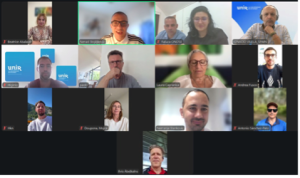
A significant part of the meeting was dedicated to the further development of the FIND ME online platform and the network of universities and faculties involved in supporting the dual career of student-athletes. Partners analysed the current number of registered higher education institutions, exchanged experiences regarding institutional outreach, and agreed on additional activities aimed at encouraging more universities and faculties to join the platform. Increasing the visibility and geographical coverage of the platform was identified as one of the key priorities for the coming months.
The meeting concluded with an overview of the agreed action points, responsibilities, and deadlines. All partners reaffirmed their commitment to the successful implementation of the FIND ME project and to strengthening collaboration in promoting sustainable dual career opportunities for student-athletes across Europe. The outcomes of the FIND ME project will be presented during the upcoming EAS Annual Conference to be held in Oulu, Finland next October 5-7, 2026.

The FIND ME project is funded by the European Union. Views and opinions expressed are however those of the author(s) only and do not necessarily reflect those of the European Union or the European Education and Culture Executive Agency (EACEA). Neither the European Union nor EACEA can be held responsible for them.

REG. NUMBER: Voluntary Organisation registration VO/1270
PIC NUMBER: 913459865
Email: info@dualcareer.eu